Languages and multilingual calls
Understand opening language, fixed-language calls, controlled language switching, and the different behavior of GPT Live and Gemini Live.
Three different language choices
The website language, the language that opens a call, and the languages an agent can use during a conversation are separate choices.
| Choice | What it controls |
|---|---|
| Website or workspace language | Translates the interface. It does not change an agent's voice configuration. |
| Opening language | The language of the greeting before following the caller begins. A homepage demo choice selects an offered agent and starting language. |
| Conversation language policy | Whether the call keeps one language or can change language during the conversation. Its behavior depends on the conversation engine. |
The languages offered on the public homepage come from eligible published demo agents. The number of choices does not restrict every agent to that set of languages, or mean that switching works only in English.
Website language and public demos
The website and workspace are available in English, Estonian, German, French, Spanish, Russian and Italian. Use the language selector to choose Italiano, or open the Italian homepage directly. An explicit homepage language URL takes precedence over a saved preference; otherwise, your saved choice takes precedence over the browser’s preferred supported language. Italian customer notification emails use the account’s saved locale.
On the homepage, the browser demo initially selects the page’s language when an eligible demo agent is available in it. You can choose another offered demo language independently. This initial selection rule applies to every website language. Starting a call keeps its selected agent and language; a later change of page locale in a retained page does not retarget that call. Changing the demo language or agent deliberately ends the current call before another starts. Reloading or leaving the page disconnects its browser call.
Italian offers the same three public examples: Receptionist IA, Assistenza clienti, and Promemoria di pagamento. These are independent demo agents, not translations applied to your own agent configuration. Payment reminders use fictional accounts and do not collect money. Browser demos are subject to availability and usage limits; choosing Italian does not provision an Italian phone number. The canonical legal documents and this documentation remain in English.
How a call chooses its response language
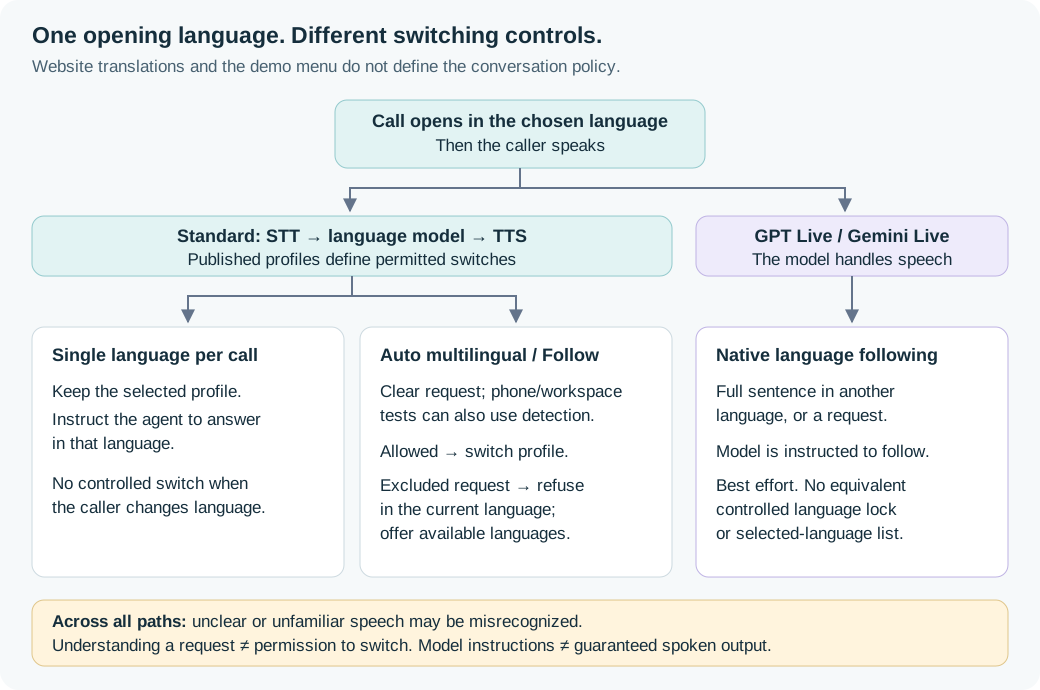
For Standard agents, speech-to-text (STT), the language model, and text-to-speech (TTS) are separate components. The editor offers Single language per call or Auto multilingual. Auto can use All supported languages for the configuration or Selected languages only. The published language profiles control which switches the runtime accepts.
Adding several languages is not, by itself, a promise that the agent will automatically detect a change. Some transcribers supply stable language evidence for automatic switching; others support switching only after the caller clearly asks. Check the capability shown for the chosen configuration.
The call surface also matters: Standard anonymous homepage demos currently support explicit-request switching, but do not connect provider language evidence to automatic switching. Authenticated workspace browser tests use the production conversation runtime, including supported provider language evidence, as phone calls do. Test each surface you intend to use. Native live engines follow language separately inside the model.
| Caller starts in English, then uses German | Expected behavior |
|---|---|
| Standard, single language per call, English selected | The agent is instructed to continue in English. There is no controlled profile switch. |
| Standard phone call or authenticated workspace browser test, Auto multilingual, German published, automatic detection supported | Supported stable recognition evidence can trigger a switch to German. |
| Standard anonymous homepage demo, Auto multilingual, German published | A clear request can trigger switching; provider-evidence automatic detection is not wired on this path. |
| Standard, Auto multilingual, German published, explicit requests only | Ask clearly, for example “Please speak German.” German speech alone does not enable automatic switching. |
| Standard, Auto multilingual, German excluded | An understood request is refused; the agent should explain the available languages in its current response language. |
| GPT Live or Gemini Live | After the opening, the model is instructed to follow a full sentence addressed to it in German, or an explicit request. This is best effort. |
Standard's language boundary controls the selected profile and accepted switch requests. It is not a guarantee that a generative model can never produce a word in another language. Test the actual audio behavior before relying on it.
GPT Live and Gemini Live work differently
Native live engines process speech in the model itself. Skysay gives them an opening-language instruction, then asks them to follow the person speaking to them. They are told not to change language because of background speech, music, recordings, or unclear audio. These instructions can still be missed.
These engines do not use Standard's Follow the caller profile switcher. A disabled Follow setting therefore does not mean a native live agent is English-only. There is currently no equivalent controlled one-language lock or selected-language allowlist on this path. A prompt restriction is a preference, not an enforced boundary. If you need a controlled language set, use a qualified Standard configuration and test it.
The engines share this instruction policy, not a measured accuracy result. See GPT-Live language testing for results specific to GPT-Live; those results do not establish Gemini Live's reliability.
Five allowed languages and a caller using a sixth
Understanding a language and being configured to answer in it are different. For a Standard agent with Auto enabled:
- If the agent understands “Please speak Dutch,” but Dutch is not published, the switch is rejected. It is instructed to offer the available languages in the current conversation language. That could be German or Estonian; it is not always English.
- If the caller simply speaks Dutch, the recognizer may not understand it. It can return an incomplete transcript or mistake it for an allowed language. The agent cannot reliably explain which language was unsupported when it did not recognize it correctly.
“All supported languages” means the compatible set available to the selected configuration at publication. It does not mean every human language.
Choosing the language before an outbound call
Use a multilingual campaign when your application already knows, or an operator has chosen, the recipient's preferred language. Skysay starts every outbound call with one saved hosted agent and one resolved language profile. With Choose before the call, the admitted profile's STT, model, TTS, and language remain fixed for that call. Follow the caller is an explicit opt-in for controlled switching among that call's admitted language profiles.
Neither mode accepts arbitrary stack changes from call_context, extraction
results, or a model instruction. A language request cannot add a new voice,
provider, or language to an active call.
Configure languages on one agent
When you create the AI agent
The Identity step of the new-agent flow asks for languages, not a language. The first one you choose opens the call; add the others as chips beside it. The Voice step then offers only the voices and transcription that cover every language you picked, so the agent you create can be published without changing its stack afterwards. Remove a chip to widen that choice again.
If you have not chosen a voice, English keeps its own default, ElevenLabs Flash, even when you add a language whose default is Google Gemini TTS (Flash-Lite 3.8), such as Polish or Hindi. That language gets Flash-Lite as its own voice instead of moving the whole agent onto it. A voice you choose yourself is always kept.
You are not committed to what you pick here. Everything on this page can be changed later in the AI agent editor's Languages section.
GPT Live and Gemini Live expose an opening language, but do not use these Standard language profiles. See how native live engines work.
Auto multilingual
In the AI agent editor, choose Auto multilingual to let the conversation follow the caller's language. Within Auto, choose All supported languages or restrict the conversation to Selected languages only. Keep a fixed language when you already know which language the caller needs.
The accepted list belongs to the selected listening and voice configuration. It is not the union of every language advertised by every provider. A language must be usable by the complete call configuration, and automatic switching also needs language information from the recognizer. The editor shows the accepted languages and any provider constraints. It does not replace your transcriber or voice to make a larger set work.
Some transcribers require a candidate list. If all compatible languages exceed that provider's simultaneous limit, choose a subset or another compatible transcriber. Skysay does not silently select a smaller list for you. The same applies to the 32 languages an AI agent can have: a transcriber with no candidate list, such as Deepgram Nova-3's multilingual mode, can be compatible with more than 32 languages, and then All supported languages is unavailable and you choose up to 32 of them.
The opening language determines how the AI agent starts before the caller speaks. Publish the configuration to freeze its accepted languages for future calls. An inventory update or later draft edit does not expand a published or active call. Review new coverage when publishing again.
Language detection may delay the first response or a language switch. Recognition accuracy and voice quality vary by language. Provider-reported support is not a quality guarantee; use the browser test to hear your actual conversation. A fixed latency penalty would be misleading because the model, region, endpointing and connection state all affect the result.
When the caller uses another language
An allowed language can become the active response language after a clear request or supported stable recognition evidence. A request cannot add an unpublished language or change the selected provider or voice.
If a request for an excluded language is understood, the AI agent should explain the available languages in its current language. Speech that the recognizer cannot understand may instead produce an incomplete or incorrect transcript. There is no guarantee that an unsupported language will be identified as unsupported: a candidate-based recognizer can label it as one of the configured languages. A clarification does not establish that the original language was correctly detected.
Shared settings and optional overrides
You do not need to copy the same agent for each language. Choose the languages the agent will offer, its opening language, and one shared voice stack. Identity, instructions, model, tools, knowledge, and business policy stay on the same agent. Use the runnable catalog to choose components that can execute the selected languages:
| Language | Catalog query |
|---|---|
| English | GET /v1/agent-catalog?language=en&metered_only=true |
| Sinhala | GET /v1/agent-catalog?language=si&metered_only=true |
| Tamil | GET /v1/agent-catalog?language=ta&metered_only=true |
The catalog is the source of truth for the currently runnable provider, model, voice, language, cost, and credential contracts. Do not hard-code a voice ID from a guide or use a provider credential to infer that a component is runnable.
For a least-privilege REST integration, grant agents:read to read this
catalog and agents:write to save the selected agent; neither account nor
wallet scope is needed. Each TTS entry's voices list contains the scoped,
provider-reported IDs available for that provider/model. The catalog reads a
last-good provider cache and never calls a provider while you read it. Use
voice_count and voices_truncated before assuming that one provider/model
inventory is complete. A partial inventory does not prove an unobserved voice
was removed, and a provider-advertised language becomes callable only when the
Skysay worker registry declares the complete runnable stack.
How Skysay handles provider languages and
voices explains the difference between browsing
provider-reported voices and admitting a runnable call stack. A cached sample
or a manual language approval is not required to configure a language.
Create an agent with POST /v1/agents, select its stack with
PATCH /v1/agents/{agent_id}/voice-stack, and read it back with
GET /v1/agents/{agent_id}/voice-stack. A voice-stack save publishes the
effective language profiles; it is not a workflow publication. Its additional
language fields are:
{
  "languages": ["en", "et", "de"],
  "language_profiles": [
    {"locale": "et", "greeting": "Tere! Kuidas saan teid aidata?"}
  ]
}
These are fields of the existing voice-stack request, not a complete stack configuration. The selected shared components must be runnable in every selected language, or you must explicitly choose a compatible per-language override. This example does not imply that every multilingual voice can run every listed language in Skysay.
An agent whose stack you have not saved yet is read back with defaults chosen
for all of its languages. For each component, Skysay takes each selected
language's own default in turn, the opening language's first, and uses the
first one that can run a call in every selected language. English plus German,
for example, shares Gemini gemini-3.1-flash-tts-preview. ElevenLabs
eleven_v3 is shared only into languages where it is already the default, so
it never becomes English's voice unless you choose it.
It costs about twice as much per character as the English-only
eleven_flash_v2_5, and it is synthesized in chunks over HTTP rather than on
Flash's realtime connection; we have not measured how its response time
compares with Flash. You can still choose eleven_v3 as the agent's voice, and
then English and Estonian share it. Each voice in GET /v1/agent-catalog lists
the languages it runs in languages and the languages it is picked for
automatically in default_languages; for eleven_v3 that is Estonian only.
ElevenLabs eleven_v4_turbo can be chosen for English, Spanish, French,
German, Italian, Portuguese, Dutch, Russian, Swedish, and Estonian. It is the
default for none of them, so an unsaved agent never lands on it, and an agent
that already has a voice keeps that voice. It is cascade text-to-speech, not a
voice-to-voice engine. It costs $0.050 per 1,000 characters. On a phone
call it uses ElevenLabs' dialogue connection, because the Flash connection
rejects this model. The end of a reply decays naturally, so Skysay does not
buffer it into sentences the way it does for eleven_v3.
When no default is shared, the opening language's default is shown. English
plus Estonian shows English's eleven_flash_v2_5, and German plus Estonian
shows German's Gemini voice; neither speaks Estonian. In the agent editor, each
language the shown voice cannot serve then gets that language's own recommended
voice as an override (eleven_v3 for Estonian), which you see and publish with
the rest.
The first voice-stack save that publishes stores the transcriber and model
shown, unless that save or an earlier one chose them. A voice needs an exact
voice_id, so it is never filled in for you: the agent editor sends the voices
it shows, and an API client chooses them. A language with no voice that can
serve it is refused at publish, and the error names the language.
Optional per-language overrides can supply an exact greeting, voice, or transcriber. Unspecified settings inherit the shared configuration; an override does not copy the whole agent. Changing a shared setting leaves explicit overrides intact. Clearing an override returns it to inheritance.
Omit language_profiles to preserve the saved overrides. When you supply the
array, send the complete desired set of sparse overrides; [] clears them.
Saving shared voice-stack settings republishes their effective inherited values
for future calls, even when the sparse override array is omitted. It does not
rewrite the explicit overrides or calls already admitted.
Read language_profiles.revision from the voice-stack response and send it as
language_profile_revision when saving languages or language_profiles to
detect a stale editor instead of overwriting a newer edit. Omitting the revision
skips this check for compatibility; it does not protect a stale client from
overwriting newer settings. The selected language set must contain 1–32 entries.
To remove a language, supply the remaining selected languages and omit any
override for the removed language from the replacement profiles array. Keep at
least one language, including the opening language; an empty set is invalid.
An exact greeting is optional. Additional languages without a greeting use a model-generated opening in the selected language through the call's normal metered model and voice path. The existing opening-language literal is preserved. Keep required disclosure and consent wording in the appropriate policy; generated wording is not a way to bypass those rules. There is no automatic recommended voice and no fallback to a different voice when a selected provider voice fails.
Publishing checks every effective per-language configuration against the rules the voice worker applies when it builds a call, not only against the component catalog. If one of them could not be built, the save is refused with a configuration error naming the language and the reason, and nothing is published: the previously published profiles keep serving calls. Fix the named language's override — or remove that language and publish the remaining set — and save again. A per-language override that selects a provider from a different runnable contract than the shared stack is the usual cause.
Test each profile before it joins a live outbound cohort: open the agent's test panel, choose a language from the Published configuration, and start the metered browser test. Profile-based tests use the published version; publish edits before testing them. Unsaved shared draft settings do not overwrite a selected language's greeting or voice. This starts a browser conversation, not an outbound phone call. Use a separate, normally funded phone call to prove the carrier route. Previewing a language in the Voice Library does not add it to the agent's callable profiles. The generated API reference has the exact request and response schemas.
Resolve the language before each call
The API creates one call at a time; it does not provide a batch-language endpoint. Keep the campaign and row-selection logic in your application:
- An operator chooses a batch default from the published set: for example,
en,et, ordefor the configuration above. - For each eligible row, use its valid language override when present; otherwise use the batch default.
- Select the saved
agent_idand request that published language, then create one governed, idempotentPOST /v1/callsrequest.
Use agent_id as the canonical saved-agent selection. agent_endpoint_id is
a backwards-compatible alias for the agent identity, not the language profile. Use
the call request's runtime_config.language field to select its language (see
the generated API reference for the call schema).
A small, non-secret
call_context can carry an application-visible label, but metadata there does
not select or override a profile.
{
  "agent_id": "agent_multilingual",
  "runtime_config": {"language": "et"},
  "external_reference": "case_456",
  "external_group_reference": "campaign_2026_08",
  "call_context": {
    "preferred_language": "et"
  }
}
Add the normal recipient, source number, policy purpose, and authorization
fields from Customer applications, and use a
unique Idempotency-Key for each attempt. Do not put current balances,
credentials, mutable case history, or a requested voice-stack override in
call_context.
On an agent whose engine picks its voice and transcription per language, the
selected language must belong to that agent's published configuration.
The voice-stack response's language_profiles.published_version and
language_profiles.published_at identify its latest publication.
Skysay resolves and validates it before reserving funds or dispatching the
call. The estimate and admitted runtime use the same effective components;
later edits cannot change an already-admitted call's voice stack. Credential
revocation and policy checks still apply. An existing single-language agent
does not become multilingual just because an application sends a new locale.
A voice-to-voice engine publishes no per-language profile, because one voice speaks every language. It accepts any language Skysay supports, opens the call in it, and needs no publishing step first; a language Skysay does not support is refused before funds are reserved.
Respect 429 and Retry-After, keep the application queue bounded, and let
your application own suppression, correct-person checks, duplicate prevention,
cadence, and retry budget. A create response only confirms the governed call
request; use signed lifecycle and evidence events to reconcile its outcome.
Optional: follow the caller
Keep Single language per call when each call should stay in its selected language. The opening language determines how the agent starts; it does not force the caller to stay in that language.
Whether Follow the caller starts on depends on where the agent came from:
- Agents that already exist, and any change you make in the editor. Off until you enable and publish it yourself. Adding a second language in the editor's Languages section does not switch it on.
- Agents created through the new-agent flow. On, but only when both are true at the moment you create it: you chose two or more languages, and the transcriber you chose declares that it can listen for all of them at once. If either is not true it is off, and nothing about the agent is blocked -- you simply get single-language behaviour until you change the transcriber and publish.
An agent created through the API with Follow the caller for all languages
("follow_caller": {"enabled": true, "scope": "all"}) is published at
creation with every language its transcriber can follow, exactly as its first
save would publish it. If that publication is refused, the agent keeps the
languages it was created with and stays unpublished, with the reason in its
metadata.publication.
To turn it off on a newly created agent, open the AI agent editor, go to
Languages, choose Single language per call, and publish. The
voice-stack API does the same thing with
{"follow_caller": {"enabled": false}}.
Follow mode requires at least two selected languages, one shared transcriber, and listening support for the selected languages together. A transcriber that supports English and German in separate monolingual calls does not necessarily support recognizing both in one conversation. Skysay checks the configured listening mode and every published profile when you publish, and again before admission. Follow mode builds all of the published profiles at the start of a call, so a language whose configuration cannot be built would end every call on the agent and not only calls in that language — which is why the publish is refused instead. If the combination is unsupported, change the configuration yourself or keep fixed-language mode; Skysay does not select a replacement voice or transcriber for you.
Use the existing voice-stack PATCH to publish the behavior with the language set. The additional behavior field is:
{
  "follow_caller": {"enabled": true, "scope": "selected"}
}
This is a partial request example, not a complete voice configuration. Read the
voice-stack response to confirm the saved setting. Set enabled to false to
publish fixed-language behavior for future calls. The call request's
runtime_config.language still chooses the starting published language; it
does not enable follow mode or supply a new profile set.
Use scope: "all" to resolve all compatible languages when publishing:
{
  "follow_caller": {"enabled": true, "scope": "all"}
}
The backend derives the concrete language set from your selected components
and effective voices. Read the response's published language list to see the
result. If a provider's simultaneous candidate limit prevents that set from
working, publication fails with a configuration error; select a smaller set
explicitly. An omitted scope retains the older selected-set behavior.
Disabling Follow does not erase an existing set of fixed per-call profiles.
Each applicable STT catalog entry exposes language_detection with
behavior (automatic or request_only), languages, and
max_candidates. These describe the listening model, not the final voice
coverage of an AI agent. A null candidate limit does not promise support for
every human language. Check the full selected configuration and the published
language set. Provider constructor options are not part of this customer API.
A caller can request a configured language directly—for example, “Please speak German” while speaking English. The agent can request a switch only to an admitted language. Automatic switching additionally requires provider language metadata supported by the adapter, and which transcriber you choose decides whether you get it. See Automatic switching availability by language for the current per-transcriber table.
Where automatic switching is available, it takes two consecutive final results that agree on the same language within the selected set. Conflicting or unrecognized signals reset that sequence. Skysay does not guess the language from individual transcript words. Provider detection can still be wrong, so test your actual conversation.
This release supports Follow mode for authenticated browser tests and inbound and outbound phone calls, including calls whose replies come from an agent workflow; see Follow mode on an agent that runs a workflow. An authenticated browser test starts in its selected published language and can follow only within that test's frozen published language set. It uses the production conversation runtime, including supported provider language evidence. The anonymous homepage demo is a separate path. This guide is not live provider or PSTN media proof; test your actual conversation before relying on it.
Switches happen at a controlled turn boundary. The conversation's shared instructions, tools, knowledge, and disclosure requirements remain in force. Publishing or removing a profile later does not change an already-admitted call. A failed switch is not reported as successful and does not trigger an unrequested fallback voice or provider.
After the call's telemetry is imported, Calls shows a bounded language history above the transcript. Applied changes are separate from rejected or failed attempts. The history identifies the active response profile, not the language of every caller utterance; old calls or incomplete evidence are labeled rather than reconstructed. See Post-call results for timing and completeness limits.
The call reserves against its admitted configuration before media starts. Switching does not create a second call or a second independent reservation; native component usage remains metered. Phone calls require purchased funds; browser-only welcome credit cannot fund them. Test the conversation and inspect call evidence before launching a cohort; a successful voice audition alone is not proof that multilingual recognition or a carrier route works.
Self-hosted gateways with issued TTS credentials
If your self-hosted gateway uses platform-issued TTS credentials, select the same TTS provider for every published language. A call with multiple admitted TTS providers is refused before media when the call's project has an issued TTS credential for any of those providers. Active, revoked, expired, and pending credentials all count: revoking or reissuing a key does not remove this multi-provider restriction. Keep one TTS provider across the language profiles.
This restriction does not apply to fully managed cloud calls, or to self-hosted gateways using their own provider keys with no platform-issued TTS credential for an admitted provider. The usual language, provider, and credential qualification checks still apply. See Deployment modes for the difference between the two hosting paths.
Public homepage demos
The anonymous homepage demo can use Follow only for a published, frozen set of platform-managed profiles. BYOK-bound profiles are not eligible, and the demo never selects a replacement provider or voice.
An agent with Follow enabled over two or more published profiles is offered as a single Multilingual choice naming the languages it speaks, rather than as one choice per language. A visitor who picks it does not choose a starting language: the session opens in the agent's published opening language. On a Standard homepage demo, an explicit request can switch within the frozen set, but provider-evidence automatic detection is not connected. A Standard agent without Follow is offered once per published language; picking one selects a single language for that call. Native live agents are offered under their opening language and can still follow the caller inside the model, as described above.
The Multilingual choice appears only when every published profile is currently runnable. If one of them is not, the agent is not offered at all rather than offered for a narrower set of languages than it promises.
The visitor token contains an opaque session, the starting stack, and (where needed) a public capability revision. It does not contain the agent prompt, other language profiles, credential bindings, or component rates. The demo agent keeps the tools its owner configured, as described in Homepage demo tools, alongside ending the session and the controlled language switch. It cannot send a text or place an outbound call.
Homepage-demo limits and platform-funded reservation remain separate from a workspace wallet. Native usage is segmented server-side against the frozen profile basis; where a provider does not supply a supported native metric, the demo is recorded as unpriced rather than estimated as measured usage.
Route a language retry after the call
Post-call extraction can label a later follow-up without changing an active conversation. Configure a small advisory schema such as:
{
  "enabled": true,
  "schema": {
    "type": "object",
    "additionalProperties": false,
    "properties": {
      "language_follow_up": {
        "type": "string",
        "enum": [
          "NONE",
          "LANGUAGE_RETRY_EN",
          "LANGUAGE_RETRY_SI",
          "LANGUAGE_RETRY_TA"
        ]
      }
    }
  }
}
When you receive a signed call.extraction.ready event, fetch the extraction
and verify the source evidence and your own policy. If your application allows
a retry, submit a later, new POST /v1/calls request with the target
published language profile, a fresh idempotency key, and its own authorization. An extraction is
advisory: it must not automatically place a call, change a customer record, or
switch an in-progress voice stack.
For a fixed-language call, record a language-change request according to your policy and use the same later-call path. Follow mode can switch only among its already-admitted profiles. In either mode, do not edit a shared agent to redirect an active conversation; new publications apply only to future calls.
Evidence and duration
Treat call.completed or call.failed and the ready recording, transcript,
and extraction events as the evidence path. Verify every signed delivery,
deduplicate by event ID, and retain only what your policy permits. See
Post-call results for verification and retrieval.
Skysay does not impose a 90-second hard cap for this flow. The outbound worker defaults to a 1,800-second maximum and a deployment can set a value from 30 through 14,400 seconds. A language retry is still a separate future call, never an automatic in-call mutation.